

The Hidden Costs of "Alpha": The Struggle with Compose Screenshot Tests
Some time ago, we decided to integrate the new Compose Screenshot Testing library into our app. Even though the library was (and still is) in alpha, the promise of a seamless, first-party setup was incredibly appealing.
Oh, how wrong we were.
The Configuration Rabbit Hole
After reviewing the official documentation, we were confident we could integrate the library and start testing in no time. We followed the setup steps to the letter: adding properties, applying the plugin, and configuring the dependencies.
Then came the first Gradle Sync. It failed with an error that would haunt us for a long time:
java.lang.NullPointerException: getValue(...) must not be null at
  com.android.compose.screenshot.PreviewScreenshotGradlePlugin$Companion
  .getSCREENSHOT_TEST_PLUGIN_VERSION(PreviewScreenshotGradlePlugin.kt:95)
We found a few similar cases online and tried every suggested fix, but nothing stuck. It appeared that the plugin application order during Gradle Sync was clashing with our current project configuration.
At this point, we decided to kill two birds with one stone. We were still managing dependencies via buildSrc, so we decided to migrate to Version Catalogs. While we didn't expect the migration itself to fix the plugin error, we hoped the cleaner structure would help us isolate the cause. (The migration of 50+ modules is a story for another day, but thanks to some AI assistance—shoutout to Junie!—we finished faster than expected.)
With the migration complete, we reapplied the plugin and—to no one's surprise—hit the same error. However, thanks to the migration, we were finally in a position to easily begin the tedious process of slowly porting our project configuration into a clean 'empty' project where the library did work.
The Culprit: A "Hidden" Classpath Collision
Eventually, we found the culprit: a plugin interdependency conflict caused by a naming collision. It turned out that both the Google screenshot library and the Kotlinter plugin were trying to package a file named version.properties at the root of their JARs.
When Gradle attempted to sync, Kotlinter "won" the collision and placed its own version.properties on the classpath. Since this file lacked the buildVersion property that the Google plugin expected, it triggered a NullPointerException, leading to the sync failure.
We reported the issue on the Google Issue Tracker and discovered that while Google has already addressed this in their source—renaming their file to the more specific com-android-compose-screenshot.properties—that fix hadn't been deployed to a public release yet. Fortunately, the Kotlinter team had already moved to a unique naming convention a few versions back to prevent exactly this type of conflict. By simply updating our Kotlinter version, the Gradle Sync finally passed.
The CI Wall
Our struggles are over! That’s what we thought…
We added tests, generated reference images and verified everything locally.
It worked perfectly—valid UI changes passed, and regressions triggered failures.
Then we moved to the CI pipeline. We introduced a new step for our tests but then the builds started failing. When we investigated the generated reports, we were met with a confusing sight:
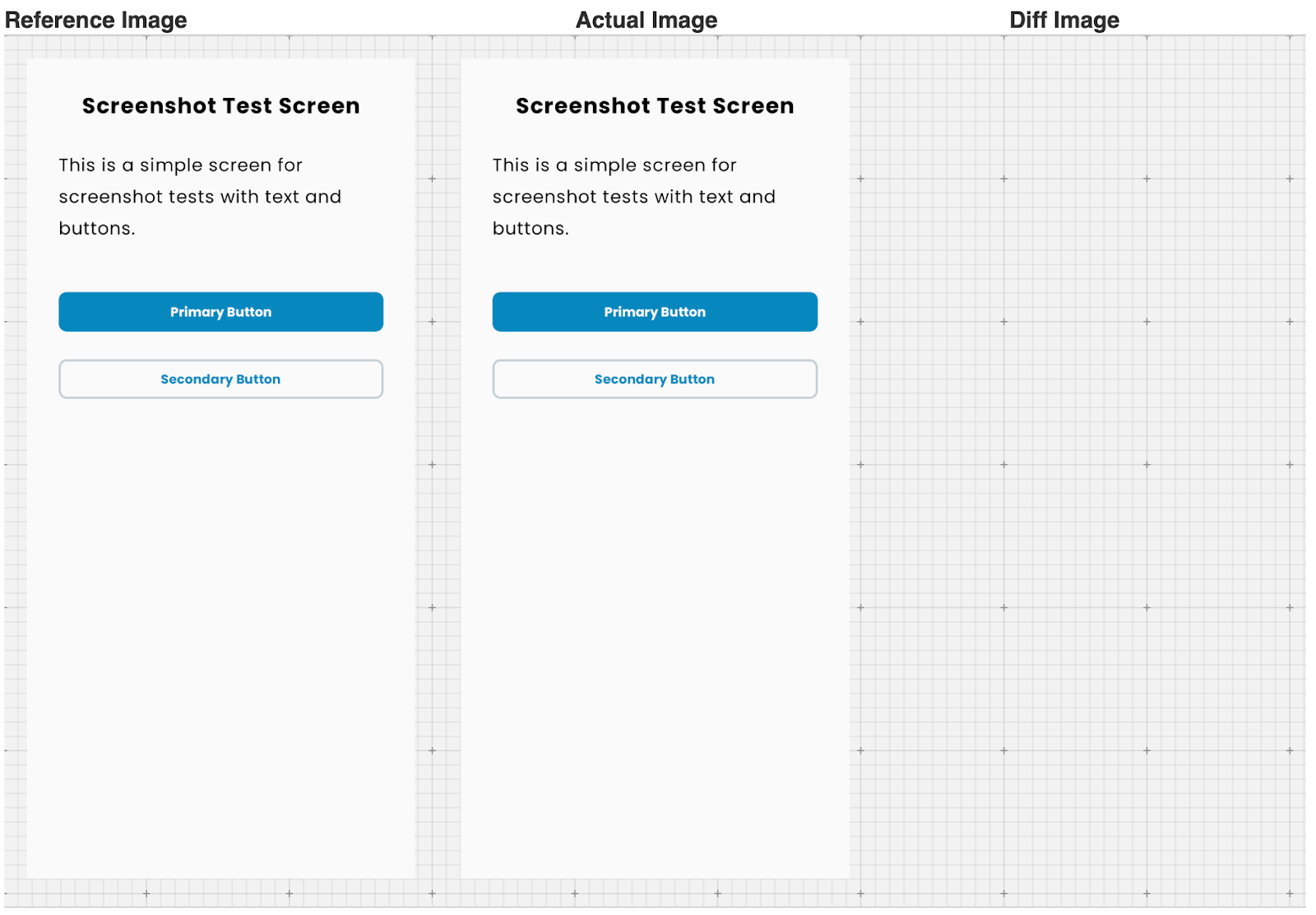
Even though there were no visible differences between the local and CI images, the validation failed. This is a classic screenshot testing hurdle: tiny environmental differences (like font rendering or GPU anti-aliasing) between local machines and CI runners.
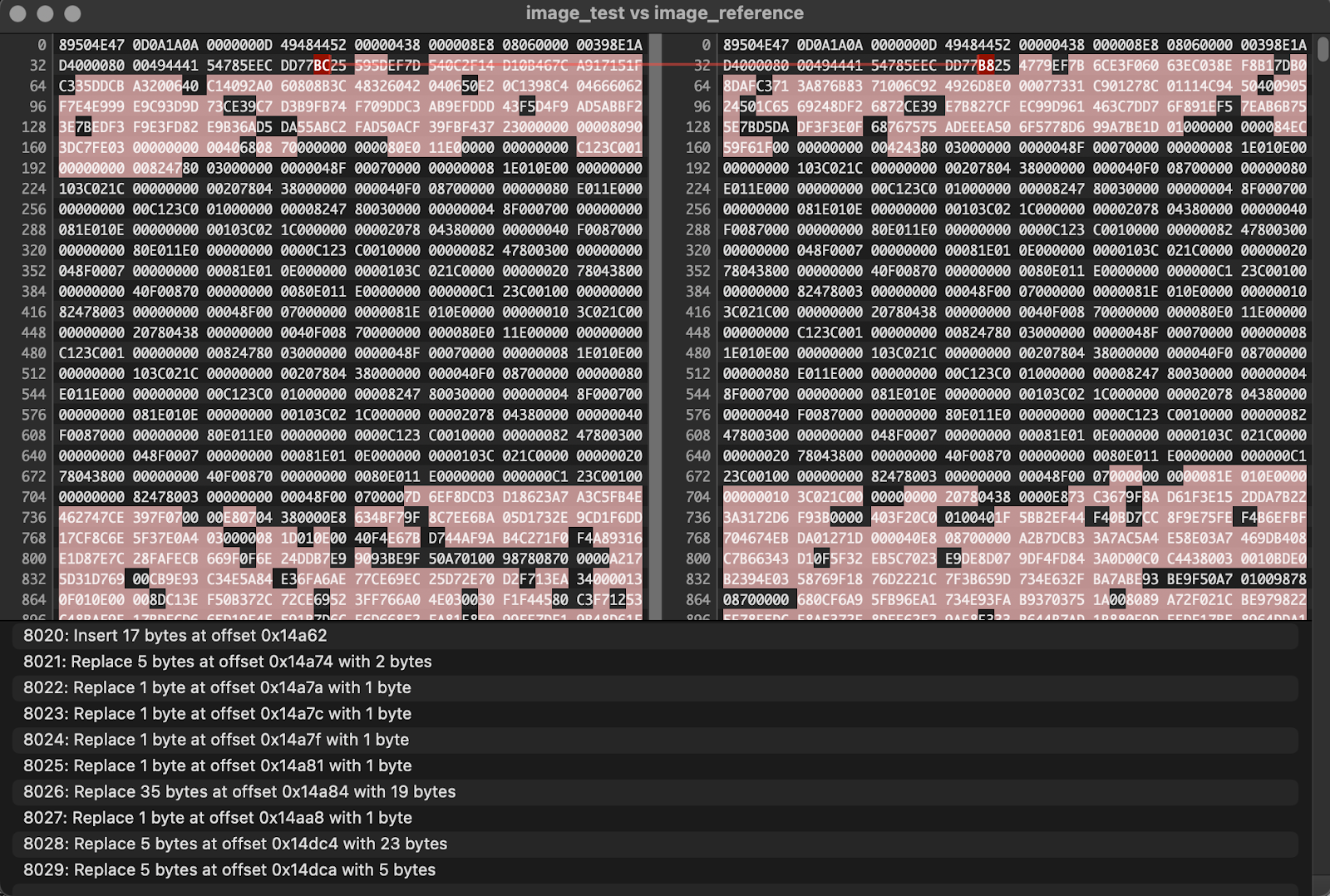
To the naked eye, the images were clones, but a dive into the metadata and hex data told a different story. Despite a mere 1-byte difference in total file size, a binary comparison revealed discrepancies at over 8000 distinct locations. This highlights how deep the "environment gap" actually goes.
We attempted to resolve this by applying an imageDifferenceThreshold, but even that didn't stabilize the results.
The Compromise
In the end, we settled on an imperfect solution. We implemented a separate CI workflow that, when triggered manually, generates new reference images and commits them directly to the feature branch.
Notably, such a server-side approach is the one recommended in the official guide. However, in our view, it remains less than ideal because it prevents us from reliably running the full validation check on our local machines. Still, it gives us a consistent environment for our "source of truth." It’s a workaround we can live with—for now.
The Verdict: Was it Worth It?
Looking back at this "Alpha" rollercoaster, you might think we regret the decision. On the contrary—despite the bumps in the road, the final outcome has brought plenty of value to our project. The initial struggle was a one-time cost that is now paying dividends in our daily development.
By pushing through the configuration hell, we’ve gained several key advantages:
-
Double Duty for Previews: It has significantly boosted our motivation to create high-quality, comprehensive
@Previewblocks. Since they now serve as the foundation for our screenshot tests, we’re essentially "killing two birds with one stone"—better documentation and automated testing in one go. -
Multi-Device Confidence: We now have much greater peace of mind regarding UI consistency across different form factors. It’s easy to overlook a layout shift on a tablet when you're primarily developing on a phone, but the screenshot suite catches these regressions instantly.
-
Faster, Fearless Refactoring: We can now refactor core UI components or update our design system tokens with much less anxiety. If a change impacts 50 screens, we know exactly which ones—and by how many pixels—within minutes.
-
Visual Documentation for the Team: The generated reference images serve as an "as-built" documentation that anyone—from QA to Designers—can review to see the current state of the UI without even running the app.
While the library is still in its early stages, the first-party integration feels like a solid long-term bet. If you can push through the initial setup friction, the boost in UI stability is well worth the effort.